Getting a certificate signing request enrolled
Problem
You want to use an externally-generated Certificate Signing Request (CSR) to get a certificate.
Solution
Upload the CSR, monitor the enrollment progress, and wait until the Certificate Authority (CA) supplies the certificate.
Before you start
You need:
- The upload destination of the certificate.
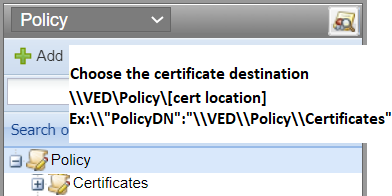
-
The path of a CA template, which is also known as the Certificate Authority Distinguished Name (CADN). The CA template provides the CA host and credentials.
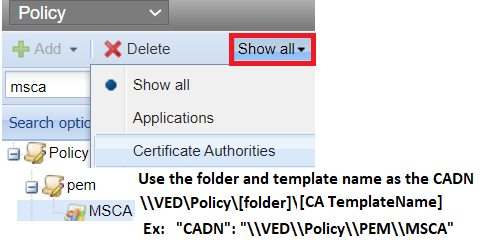
Time Estimate
About 30 mins
To get a certificate signing request enrolled
-
Reuse or create a bearer token that includes the scope certificate:manage. The bearer token grants your client access to Trust Protection Foundation.
To get a bearer token, see Getting a token. For each subsequent API call, be sure to include the token in the request header. -
Generate a CSR and initiate enrollment with a POST Certificates/Request. For example:
CopyJSON
POST https://tpp.venafi.example/vedsdk/Certificates/Request
Content-Type:application/json
Authorization:Bearer xxxxxx==
{
   "PolicyDN":"\\VED\\Policy\\Certificates",
   "CADN":"\\VED\\Policy\\pem\\msca",
   "PKCS10":"-----BEGIN CERTIFICATE REQUEST-----MIIDSTCC...-----END CERTIFICATE REQUEST-----"

}CopyPowershell
$RestAPIServer = "https://tpp.venafi.example"
$RestAPIURI = '/vedsdk/certificates/request'
$RestRequest = $RestAPIServer + $RestAPIURI
Write-Output $RestRequest

$headers = New-Object "System.Collections.Generic.Dictionary[[String],[String]]"
$headers.Add("Content-Type", "application/json")
$headers.Add("Authorization", "Bearer xxxxxx==")

$body = @{PolicyDN ="\VED\Policy\Certificates";CADN ="\VED\Policy\pem\msca";PKCS10 ="-----BEGIN CERTIFICATE REQUEST-----MIIDSTCC...----END CERTIFICATE REQUEST-----"}
$json = ConvertTo-Json $body
$result = Invoke-RestMethod  -Headers $headers -Uri $RestRequest -Method Post -Body $body -ContentType 'application/json'
Write-Output $resultCopyPythonimport requests
headers = {
'Content-Type': 'application/json',
'Authorization': 'Bearer xxxxxx=='
}
uri = "https://tpp.venafi.example"
url = uri + "/vedsdk/Certificates/Request"
payload="{
"PolicyDN": "\\VED\\Policy\\Certificates",
"CADN": "\\VED\\Policy\\PEM\\MSCA",
"PKCS10": "-----BEGIN CERTIFICATE REQUEST-----MIIDSTCC...-----END CERTIFICATE REQUEST-----"
}
response = requests.request("POST", url, headers=headers, data=payload)
print(response.text) - From the response, save the GUID that identifies the certificate. Wait until Trust Protection Foundation has time to enroll the certificate.
-
To view enrollment progress in Trust Protection Foundation, call GET Certificates/{guid}. For example:
CopyJSONPOST https://tpp.venafi.example/vedauth/authorize/oauth
{
"client_id": "MyClient",
"username": "local:admin",
"password": "MyPassword!",
"scope": "certificate:manage,delete"
}
And
GET https://tpp.venafi.example/vedsdk/Certificates/{278b6ba4-1dc5-4da2-9274-0e086fa7ee54}
Authorization:Bearer xxxxxx==CopyPowershell
$headers = New-Object "System.Collections.Generic.Dictionary[[String],[String]]"
$headers.Add("Content-Type", "application/json")
$headers.Add("Authorization", "Bearer xxxxxx==")

$result = Invoke-RestMethod 'https://tpp.venafi.example/vedsdk/certificates/{5841e532-d10f-49fb-8e54-f714fe712a46}' -Method 'GET' -Headers $headers
$result | ConvertTo-JsonCopyPython
import requests
headerswToken = {
'Content-Type': 'application/json',
'Authorization': 'Bearer xxxxxx=='
}
url = "https://tpp.venafi.example/vedsdk/Certificates/{278b6ba4-1dc5-4da2-9274-0e086fa7ee54}}"
r = requests.get(url, headers = headerswToken)
data = r.json() -
(Optional) Download the certificate using POST Certificates/Retrieve. For example:
CopyJSON
POST https://tpp.venafi.example/vedsdk/Certificates/Retrieve
Authorization:Bearer xxxxxx==
{
   "CertificateDN":"\\VED\\Policy\\Certificates\\MyCertificate",
   "Format":"Base64",
   "IncludeChain":true,
   "RootFirstOrder":true
}CopyPowershell
$RestAPIServer = "https:///tpp.venafi.example"
$RestAPIURI = '/vedsdk/certificates/retrieve'
$RestRequest = $RestAPIServer + $RestAPIURI
Write-Output $RestRequest

$headers = New-Object "System.Collections.Generic.Dictionary[[String],[String]]"
$headers.Add("Content-Type", "application/json")
$headers.Add("Authorization", "Bearer xxxxxx==")

$body = @{CertificateDN="\VED\Policy\Certificates\MyCertificate";Format="Base64";IncludeChain="true";RootFirstOrder="true"}
$json = ConvertTo-Json $body

$result = Invoke-RestMethod $RestRequest -Method POST -Headers $headers -Body $json -ContentType 'application/json'
Write-Output $resultCopyPython
import requests

headers = {
    'Content-Type': 'application/json',
    'Authorization': 'Bearer xxxxxx=='
}

uri = "https://https://tpp.venafi.example"
url = uri + "/vedsdk/Certificates/Retrieve"

payload = {
   "CertificateDN":"\\VED\\Policy\\Certificates\\MyCertificate",
   "Format":"Base64",
   "IncludeChain": "true",
   "RootFirstOrder": "true"
}
r = requests.post(url, headers = headerswToken, json = payload)
data = r.json() -
(Optional) Manually install the certificate to the device.