FAQ: Self-signed certificates
This section offers answers to commonly asked questions about self-signed certificates.
 How does Trust Protection Foundation identify a self-signed certificate?
For a certificate to be self-signed, the following must be true (as shown in Certificate Details:
- The Subject DN and the Issuer DN are the same and
- Basic Constraints is set to CA=False
Or
Key Usage is set to one or more of the following:
- Digital Signature
- Content Commitment
- Key Encipherment
- Data Encipherment
- Key Agreement
- Encipher Only
- Decipher Only
For a certificate to be a root certificate, the following must be true (as shown in Certificate Details:
- The Subject DN and the Issuer DN are the same, and
- Basic Constraints is set to CA=True.
- Key usage is set to KeyCertSign.
- Basic Constraints and Key Usage are not used.
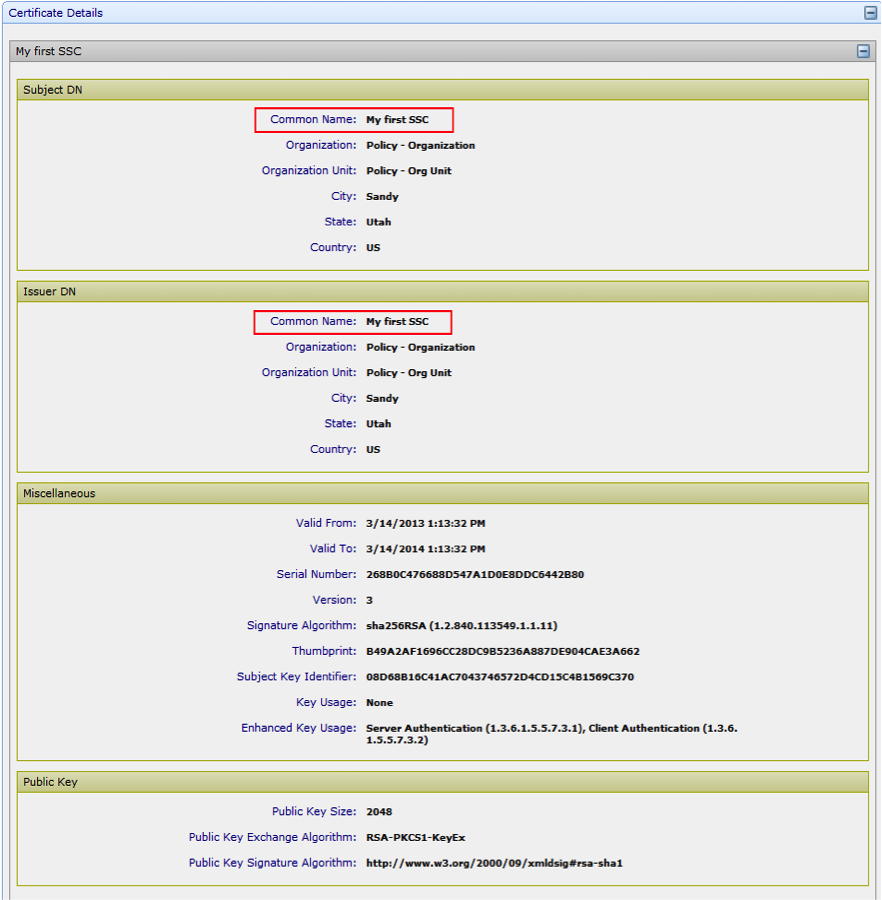
What happens to self-signed certificates that are currently in the Roots tree?
Existing self-signed certificates remain in the Roots tree. However, subsequent self-signed certificates cannot be placed there. They can only be placed in the Policy tree.
What happens to self-signed certificates that are identified and brought under management through agent discovery?
Self-signed Certificates are discovered and delivered to the appropriate discovery queues for review. These certificate types are changed to self-signed. Administrators can place self-signed certificates in the Policy tree. These certificates can no longer be placed in the Roots tree.
Can I revoke self-signed certificates?
Self-signed certificates cannot be revoked. They can, however, be renewed through the standard renewal process.
How are self-signed certificates similar to CA-issued certificates in Trust Protection Foundation?
Just as you can with CA-issued certificates, you can do the following with self-signed certificates:
- Renew, import, and retrieve
- Add, remove, push, extract, enable, and retry application certificates
- Configure notifications for self-signed certificates.
Self-signed certificates are also displayed in log events, grids, and reports, in the same way CA-issued certificates are displayed.
When I look at the certificate details, under Key Usage, I see "Information Not Available." What does that mean?
Information Not Available means that the combination of key usages you chose when you set up the self-signed certificate template are incorrect. Valid combinations are displayed. But invalid combinations return Information Not Available.
For more information about self-signed certificates, see About self-signed certificates in Trust Protection Foundation.