DigiCert CertCentral—certificate settings
When you define a CA template object, you provide the information Trust Protection Foundation needs to connect to the CA. However, when you associate the DigiCert CA object with a specific certificate object, you must define additional settings that are specific to the certificate—information such as the Validity Period, Server Count, and Server Type. These settings are passed to DigiCert CertCentral when Trust Protection Foundation renews the certificate.
When you select the CA template in the certificate object, you must complete the DigiCert settings.
If the associated DigiCert CA template uses a Secure Email (S/MIME) product, additional certificate-specific fields appear on this page. These fields apply only to Secure Email certificate requests.
In the Policy Tree, the DigiCert CA settings are presented on the certificate object configuration page when you select the DigiCert CA Template object.
DigiCert configuration page
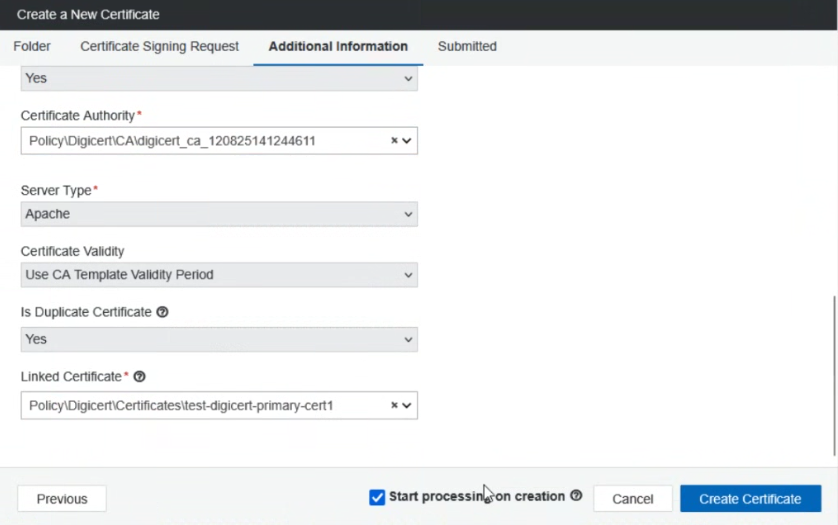
Policy Tree: DigiCert certificate settings

The following table describes the certificate object settings.
| Field | Policy | Description |
|
Settings |
||
|
Server Type |
Yes |
Type of server that the certificate is installed on. |
|
Certificate Validity TIP The Certificate Validity option is available only when the Allow Users to Specify End Date option is enabled on the associated DigiCert CA template. For more information, see Allow Users to Specify End Date . |
No |
Specify the period of time that the certificate is valid by selecting one of the following options:
|
|
Duplicate Certificate |
Yes |
|
|
Linked Certificate |
No |
Specifies the primary certificate object used as the parent for a duplicate request. This allows the CA to issue child or duplicate certificates linked to the original order ID. TIP The Linked Certificate setting is only available if a duplicate certificate is enabled. A linked certificate must be a pre-enrolled certificate. |
|
S/MIME Settings |
||
|
Common Name Indicator |
Yes |
Determines how the certificate Common Name (CN) is constructed for Secure Email (S/MIME) certificates. Options include Email Address, Given Name + Surname, Pseudonym, and Organization Name. This field appears only when the associated CA template uses a Secure Email product. |
|
First Name |
Yes (Conditional) |
Required only when Common Name Indicator is set to "Given Name + Surname". Must correspond to the local part of the email address. Appears only for Secure Email products. |
|
Last Name |
Yes (Conditional) |
Required only when Common Name Indicator is set to "Given Name + Surname". Appears only for Secure Email products. |
|
Primary Usage |
Yes |
Specifies how the Secure Email certificate is used. Options include Dual Use, Signing Only, and Encryption Only. Appears only for Secure Email products. |
|
Email SAN |
Yes |
At least one Email Subject Alternative Name (SAN) must be included for Secure Email certificates. If no Email SAN is specified, enrollment fails. |