Understanding CA template chaining
During the certificate enrollment process, certificate chains are automatically populated from the certificate authority.
When building a chain for a certificate, TLS Protect can use three sources of information
-
Chains from the CA during enrollment
-
Certificates on the roots tree
-
Windows certificate store
You can remove chain options that you do not want or add additional options when you need more granular control.
The Certificate Chain Preferences tab allows you to configure how certificates are chained for a CA Template object. This tab is visible for every CA template object, except self-signed CAs. If no issuing certificate is populated, the option defaults to automatic chaining options.
After saving the issuing certificate, you can select their preferred chain option when multiple options are available. If the selected intermediate is not the actual issuing certificate, it will be overwritten by the actual issuing certificate upon issuance.
The chain preferences assigned to a CA template object are only effective for certificates assigned the CA template object via policy or directly on the certificate object. If you have different chaining needs for different policy folders, you can create multiple CA template objects, configure each with the desired chaining, and assign them to the appropriate policy folders. The chaining of the certificate is determined by the certificate’s assigned or effective CA template object.
NOTE Chain options are automatically re-populated each time a certificate is enrolled. If a chain is manually removed, it will be re-populated if the certificate is re-enrolled.
NOTE Not all drivers support automatic certificate chain options.
To view or add certificate chain options.
-
From the Certificate Manager menu bar, click Policy Tree.
- In the Policy tree, select the CA template.
- Select the Certificates Chain Preferencestab.
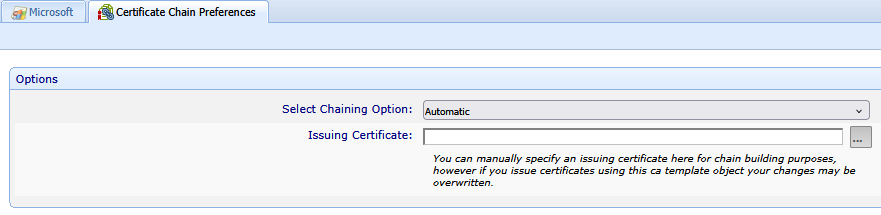
- Select your desired chaining option and issuing certificate.
You can manually specify an issuing certificate for chain building purposes; however, any changes you make may be overwritten when certificates are issued using this CA template object.
- Click Save.