Setting up SSH Manager for Machines for agent and agentless discovery
Before you can discover and remediate SSH keys and risk factors, you must first install and configure the CyberArk Trust Protection Foundation server with the SSH Manager for Machines product. Then you need to configure agentless discovery on host machines, or install the Server Agent on host machines. Host machines are machines that have SSH key data that you want to secure and protect.
Agentless discovery is useful in situations like the following:
-
For scanning devices that have Unix-based operating systems that are not supported by the Server Agent;
-
When for either security or convenience purposes, you don’t want to install agents.
In these cases, see "Discovering and remediating keys without the Server Agent" for details.
When possible, we recommend using the Server Agent, as it provides additional functionality over agentless discovery.
After the Server Agent is correctly installed and configured, (or agentless discovery is configured) you can begin configuring SSH work for discovering SSH keys and remediating security threats.
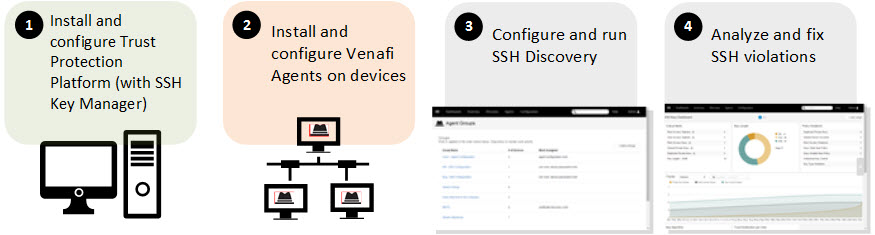
High-level steps to getting SSH key discovery and remediation up and running.
-
Install and configure the Trust Protection Foundation server and select the SSH Manager for Machines product during installation.
For more information about installing Trust Protection Foundation, refer to the Installation instructions .
-
Install and configure Server Agents on devices where you want to manage encryption assets, such as SSH keys.
For detailed instructions on Server Agent deployment and configuration, refer to "Server Agent registration and installation overview" .
IMPORTANT If you have already installed Trust Protection Foundation and the Server Agent and you are simply configuring SSH discovery for the first time, you should configure an SSH Policy before running the agents so that discovery results are organized in a way that works for you.
For more information, see Configuring Policies for SSH. For a better understanding of folders, see Using policies to manage encryption assets CyberArk Trust Protection Foundation Administration Guide.
-
(Conditional) If during the previous step (Agent Connectivity) you configured SSH discovery, but it has not yet run, run it now.
You can either wait for the agent schedule to run, or you can run it manually. For more information, see Creating and assigning Work and Setting up SSH discovery work for Server Agents.
-
Analyze and fix SSH violations.
For more information, see Analyzing and fixing SSH violations.
TIP To browse topics in this section, use the menu on the left side of this page.