Using management partitions
Segmented and isolated environments sometimes exist. Some are very easy where every Trust Protection Foundation server can talk to any part of the network. In others, only certain servers can get to the internet. Some environments contain servers that are isolated to network segments, down to a level where every IP address and Port needs to have a rule to pass through a firewall. Some are even trickier still because two data centers exist and both data centers use identical IP addresses.
 Examples
Case 1: Limited access to the internet
Customer environments where only one of the three Trust Protection Foundation servers in the environment can talk to a CA out on the internet. This server is basically in a security zone and is not allowed to talk freely inside the private network either.
Case 2: Isolated network segments
Not all Trust Protection Foundation servers have the ability to talk to every target machine in the environment.
Case 3: Duplicate data centers
When two identical data centers exist and failover protection is needed. Everything is identical in this environment, including the IP addresses, which makes managing this environment tricky.
All three of these cases can be represented with this policy tree structure:
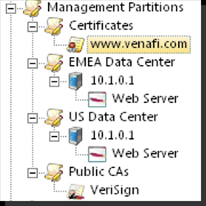
To solve this issue
Scenario
If you look at a the Policy section in the Policy Tree, you'll see a section called Processing Engines. By default, this configuration is empty, which means that any Trust Protection Foundation engine can process objects within that folder and below.
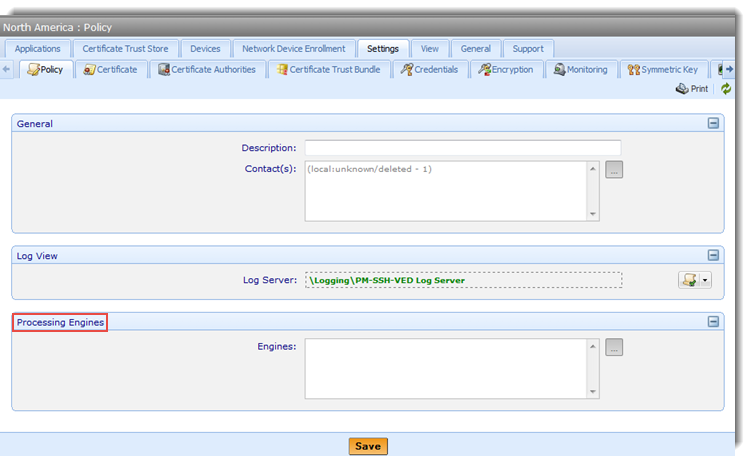
If you specify one or more Trust Protection Foundation engines in that configuration only those engines can process objects in that policy folder and below.
Now, if you have three Trust Protection Foundation servers in your environment with the following names and restrictions:
- DMZ Trust Protection Foundation– Can only connect to systems in the Public internet, but also has firewall rules allowing it to connect to the database.
- Data Center A Trust Protection Foundation– Can only talk to Data Center A
- Data Center B Trust Protection Foundation– Can only talk to the Data Center B
Configure the folders in this way:
For certificates in Data Center A and Data Center B:
- If the certificates have private keys generated by the Trust Protection Foundation, then all that is needed is a Trust Protection Foundation server that can access the DB to generate the Private Key and CSR for the certificate. In this case, either Data Center A or Data Center B server can process the certificate.
- The DMZ Trust Protection Foundation server should not process the certificate because you do not want the Private Keys to be generated outside of the protected network.
For devices in Data Center A
- Only the Data Center A server has the ability to access Data Center A for certificate installation and validation purposes.
For devices in Data Center B
- Only the Data Center B server has the ability to access Data Center B for certificate installation and validation purposes.
Public CAs – DMZ Trust Protection Foundation
- Only the DMZ Trust Protection Foundation server has access to the Internet to talk to Symantec.
About renewing the ‘www.venafi.com’ certificate
Here is the example screenshot.
-
Set the certificate for renewal. See Scheduling a certificate renewal for more information.
-
Certificate work:
Between stages 0 and 400, the certificate object is being processed by either the Data Center A or Data Center B server.
Keys off of the certificate object if central gen, keys off of the application object if remote key gen.
-
Enrollment work:
Between stages 500-700 , the CA object is effectively being interacted with, which means the Data Center A or Data Center B server will stop working on the job and the DMZ server will pick it up.
Keys off of the CA template assigned to the certificate object.
-
Provisioning work:
Between stages 800-1200, the Certificate is being provisioned to the Application, which means the Data Center A or Data Center B server will process the job for the appropriate data center.
A separate Provisioning To Do is created for each application object associated with the certificate. Partition Management keys off of each application object.
-
Revocation work:
Stage 1400.
Keys off of the CA template chosen to perform the revocation and favors by evaluating the Issuer to figure out which CA template to use. Partition management keys off of the CA template.
NOTE For more information about stages, see Workflow object settings.
-
IMPORTANT CDP Monitoring and Revocation Checking does not honor engine partitioning in the Policy tree.